目次
vue-smooth-pickerとは
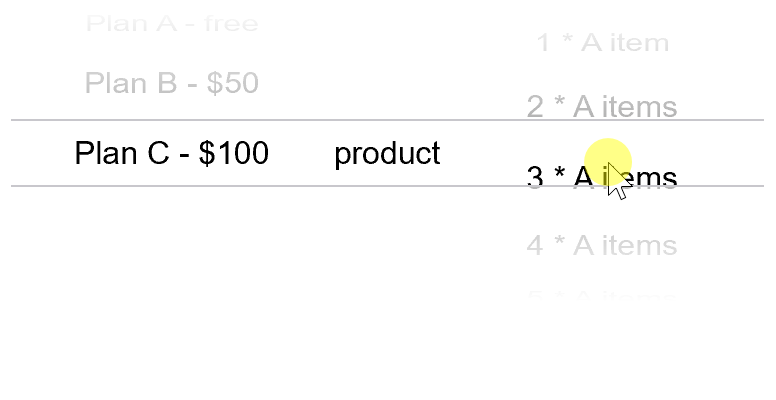
vue-smooth-pickerは、iOSのネイティブ日付ピッカーのようなものを実装ですることができるコンポーネントライブラリです。
【動画サイズ:59KB】
環境
| Vue | 2.6.10 |
| vue-smooth-picker | 0.4.2 |
インストール
以下のnpm、CDNを使ってインストールします。
npm
npm i -S vue-smooth-picker
UMD
<link rel="stylesheet" href="https://cdn.jsdelivr.net/npm/[email protected]/dist/css/style.css">
<script src="https://cdn.jsdelivr.net/npm/[email protected]/dist/smooth-picker.js"></script>
gitリポジトリは以下から取得できます。
https://github.com/hiyali/vue-smooth-picker
導入手順
1. ライブラリの取り込み
(1)ES6等の場合 [注意]モジュール版は未検証です。
import 'vue-smooth-picker/dist/css/style.css'
import SmoothPicker from 'vue-smooth-picker'
(2)UMDの場合
const SmoothPicker = window['SmoothPicker'].default;
2.メソッドを設定
上記で取得したSmoothPicker をVue.useに取り込みます。
Vue.use(SmoothPicker);
new Vue({
  el: '#app',
  data: {
    data: [
      {
        currentIndex: 0,
        flex: 3,
        list: [
          'Plan A - free', 'Plan B - $50', 'Plan C - $100'
        ],
        onClick: this.clickOnPlan,
        textAlign: 'center',
        className: 'row-group'
      },
      {
        divider: true,
        flex: 1,
        text: 'product',
        textAlign: 'center',
        className: 'divider'
      },
      {
        currentIndex: 2,
        flex: 3,
        list: [
          '1 * A item', '2 * A items', '3 * A items', '4 * A items', '5 * A items'
        ],
        onClick: this.clickOnProduct,
        textAlign: 'center',
        className: 'item-group'
      }
    ]
  },
  methods: {
    dataChange: function(gIndex, iIndex){
      console.log('change');
      console.log(gIndex, iIndex);
    }
  }
});
3. テンプレートを準備
<smooth-picker> を設置します。
[注意] サンプルはケバブケースで記載しています。
<div id="app">
  <smooth-picker ref="smoothPicker" :data="data" :change="dataChange"></smooth-picker>
</div>
サンプル
さいごに
iOSのネイティブ日付ピッカーのようなものを実装ですることができるコンポーネントライブラリでした。
今日はこの辺でー
