目次
vue-form-generatorとは
vue-form-generatorは、21種類のフォーム要素をJSONで管理できるコンポーネントライブラリです。
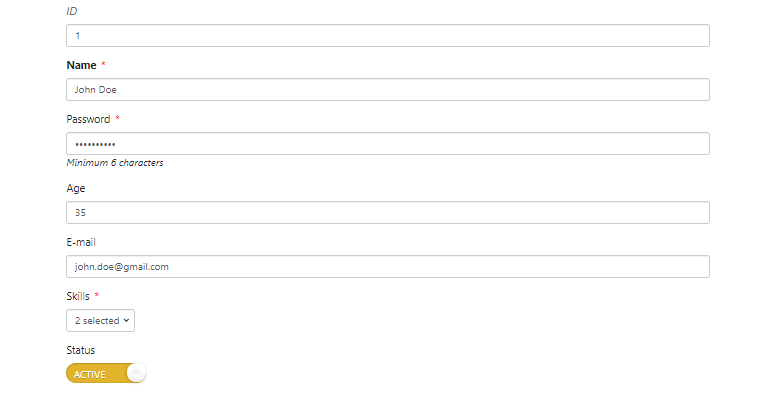
環境
| Vue | 2.6.10 |
| vue-form-generator | 2.3.4 |
インストール
以下のnpm、CDNを使ってインストールします。
npm
npm install vue-form-generator
CDN
<link rel="stylesheet" href="https://cdn.jsdelivr.net/npm/[email protected]/dist/vfg.css">
<script src="https://cdn.jsdelivr.net/npm/[email protected]/dist/vfg.js"></script>
gitリポジトリは以下から取得できます。
https://github.com/vue-generators/vue-form-generator
導入手順
1. ライブラリの取り込み
(1)webpack等の場合 [注意]モジュール版は未検証です。
import VueFormGenerator from "vue-form-generator";
import "vue-form-generator/dist/vfg.css";
(2)WEBページの場合
const VueFormGenerator = window['VueFormGenerator'];
2.メソッドを設定
上記で取得したVueFormGeneratorのcomponentプロパティをcomponentsに取り込みます。
new Vue({
  el: '#app',
  components: {
    "vue-form-generator": VueFormGenerator.component
  },
  data: {
    model: {
      id: 1,
      name: "John Doe",
      password: "J0hnD03!x4",
      age: 35,
      skills: ["Javascript", "VueJS"],
      email: "[email protected]",
      status: true
    },
    schema: {
      fields: [
        {
          type: "input",
          inputType: "text",
          label: "ID",
          model: "id",
          readonly: true,
          featured: false,
          disabled: true
        }, {
          type: "input",
          inputType: "text",
          label: "Name",
          model: "name",
          readonly: false,
          featured: true,
          required: true,
          disabled: false,
          placeholder: "User's name",
          validator: VueFormGenerator.validators.string
        }, {
          type: "input",
          inputType: "password",
          label: "Password",
          model: "password",
          min: 6,
          required: true,
          hint: "Minimum 6 characters",
          validator: VueFormGenerator.validators.string
        }, {
          type: "input",
          inputType: "number",
          label: "Age",
          model: "age",
          min: 18,
          validator: VueFormGenerator.validators.number
        }, {
          type: "input",
          inputType: "email",
          label: "E-mail",
          model: "email",
          placeholder: "User's e-mail address",
          validator: VueFormGenerator.validators.email
        }, {
          type: "checklist",
          label: "Skills",
          model: "skills",
          multi: true,
          required: true,
          multiSelect: true,
          values: ["HTML5", "Javascript", "CSS3", "CoffeeScript", "AngularJS", "ReactJS", "VueJS"]
        }, {
          type: "switch",
          label: "Status",
          model: "status",
          multi: true,
          readonly: false,
          featured: false,
          disabled: false,
          default: true,
          textOn: "Active",
          textOff: "Inactive"
        }
      ]
    },
    formOptions: {
      validateAfterLoad: true,
      validateAfterChanged: true
    }
  }
});
3. テンプレートを準備
<vue-form-generator>を設置します。
必須のプロパティは以下になります。
| schema | スキーマのオブジェクトを配列で設定 |
| model | スキーマのmodel |
[注意] サンプルはケバブケースで記載しています。
<div id="app">
  <div class="panel-body">
    <vue-form-generator :schema="schema" :model="model" :options="formOptions"></vue-form-generator>
  </div>
</div>
サンプル
さいごに
21種類のフォーム要素をJSONで管理できるコンポーネントライブラリでした。
スキーマをJSONで管理できるので、Vue.Draggableと組み合わせてスキーマの追加や並び替えなどを実装できる予感がしますね。
時間が空いたら作って見ようと思います。
今日はこの辺でー
