目次
はじめに
今回はテキストの中から検索ワードをハイライトするライブラリ「Vue Text Highlight」をご紹介します。
環境
Vue.js: 2.6.10
vue-text-highlight: 2.0.6
インストール
以下のnpm、yarnのどれか一つを使ってインストールします。
npm
npm install --save vue-text-highlight
yarn
yarn add vue-text-highlight
gitリポジトリは以下から取得できます。
https://github.com/AlbertLucianto/vue-text-highlight
導入手順
1. ライブラリの取り込み
webpack等の場合
import Vue from 'vue';
import TextHighlight from 'vue-text-highlight';

Vue.component('text-highlight', TextHighlight);

new Vue({
  el: "#app",
  data: {
    queries: 'birds',
    description: 'Tropical birds scattered as Drake veered the Jeep Tropical birds scattered as Drake veered the Jeep Tropical birds scattered as Drake veered the Jeep'
  }
})
WEBページの場合
<script src="./node_modules/vue-text-highlight/dist/vue-text-highlight.min.js"></script>
Vue.component('text-highlight', window.VueTextHighlight.default);

new Vue({
  el: "#app",
  data: {
    queries: 'birds',
    description: 'Tropical birds scattered as Drake veered the Jeep Tropical birds scattered as Drake veered the Jeep Tropical birds scattered as Drake veered the Jeep'
  }
})
2. <text-highlight>テンプレートを準備
検索対象のテキストを<text-highlight>テンプレートで囲みます。
検索ワードはqueriesプロパティに持たせます。
<div id="app">
  <input type="text" v-model="queries">
  <p>
    <text-highlight :queries="queries">{{ description }}</text-highlight>
  </p>
</div>
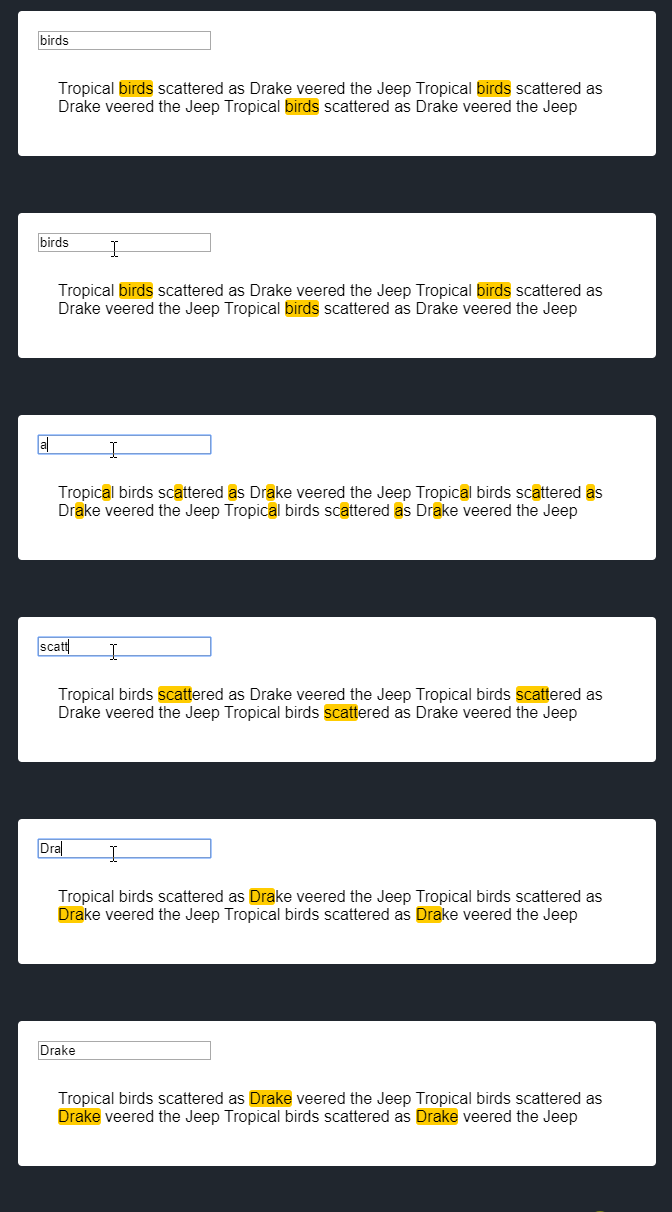
デモ
まとめ
検索ワードをhighlightするライブラリ「Vue Text Highlight」でした。
まだまだ発展途上で話題になっていませんが、今後Vueを使ったアプリが開発されてくると注目されてくるライブラリだと思います。
ぜひ試してください。
今日はこの辺でー
