目次
gantt-elasticとは
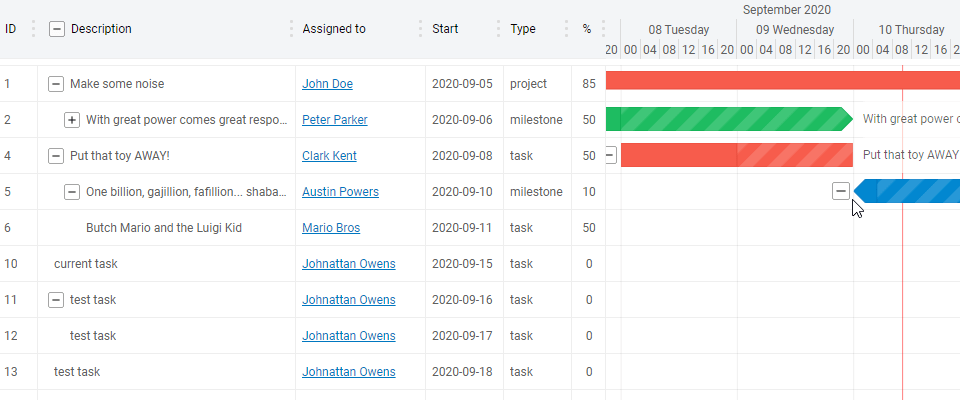
gantt-elasticは、ガントチャートを実装できるコンポーネントライブラリです。
折りたたんだり、アロー線で繋いだりと、軽量な割に高機能なライブラリとなっています。
【動画サイズ:406KB】
環境
この記事は、以下の管理人の検証環境にて記事にしています。
| vue.js | 2.6.10 |
| gantt-elastic | 1.0.11 |
| gantt-elastic-header | 1.0.11 |
ライブラリの取得
ライブラリを取得するには、npm, CDNのどれか一つを使用します。
npm
npm install --save gantt-elastic

npm install --save gantt-elastic-header
CDN
<script src="https://cdn.jsdelivr.net/npm/[email protected]/dayjs.min.js"></script>

<script src="https://cdn.jsdelivr.net/npm/[email protected]/dist/GanttElastic.umd.js"></script>

<script src="https://cdn.jsdelivr.net/npm/[email protected]/dist/Header.umd.js"></script>
gitリポジトリは以下から取得できます。
導入手順
管理人が行った、動作確認サンプルを実装するために、以下の手順でソースコードを導入していきます。
このサンプルでは、ガントチャートを実装します。
step
1メソッドを設定
function getDate(hours) {
    const currentDate = new Date();
    const currentYear = currentDate.getFullYear();
    const currentMonth = currentDate.getMonth();
    const currentDay = currentDate.getDate();
    const timeStamp = new Date(currentYear, currentMonth, currentDay, 0, 0, 0).getTime();
    return new Date(timeStamp + hours * 60 * 60 * 1000).getTime();
}
let tasks = [
    {
      id: 1,
      label: 'Make some noise',
      user:
        '<a href="https://www.google.com/search?q=John+Doe" target="_blank" style="color:#0077c0;">John Doe</a>',
      start: getDate(-24 * 5),
      duration: 15 * 24 * 60 * 60 * 1000,
      progress: 85,
      type: 'project'
      //collapsed: true,
    },
    {
      id: 2,
      label: 'With great power comes great responsibility',
      user:
        '<a href="https://www.google.com/search?q=Peter+Parker" target="_blank" style="color:#0077c0;">Peter Parker</a>',
      parentId: 1,
      start: getDate(-24 * 4),
      duration: 4 * 24 * 60 * 60 * 1000,
      progress: 50,
      type: 'milestone',
      collapsed: true,
      style: {
        base: {
          fill: '#1EBC61',
          stroke: '#0EAC51'
        }
        /*'tree-row-bar': {
          fill: '#1EBC61',
          stroke: '#0EAC51'
        },
        'tree-row-bar-polygon': {
          stroke: '#0EAC51'
        }*/
      }
    },
    {
      id: 3,
      label: 'Courage is being scared to death, but saddling up anyway.',
      user:
        '<a href="https://www.google.com/search?q=John+Wayne" target="_blank" style="color:#0077c0;">John Wayne</a>',
      parentId: 2,
      start: getDate(-24 * 3),
      duration: 2 * 24 * 60 * 60 * 1000,
      progress: 100,
      type: 'task'
    },
    {
      id: 4,
      label: 'Put that toy AWAY!',
      user:
        '<a href="https://www.google.com/search?q=Clark+Kent" target="_blank" style="color:#0077c0;">Clark Kent</a>',
      start: getDate(-24 * 2),
      duration: 2 * 24 * 60 * 60 * 1000,
      progress: 50,
      type: 'task',
      dependentOn: [3]
    }
  ];
  let options = {
    maxRows: 100,
    maxHeight: 300,
    title: {
      label: 'Your project title as html (link or whatever...)',
      html: false
    },
    row: {
      height: 24
    },
    calendar: {
      hour: {
        display: false
      }
    },
    chart: {
      progress: {
        bar: false
      },
      expander: {
        display: true
      }
    },
    taskList: {
      expander: {
        straight: false
      },
      columns: [
        {
          id: 1,
          label: 'ID',
          value: 'id',
          width: 40
        },
        {
          id: 2,
          label: 'Description',
          value: 'label',
          width: 200,
          expander: true,
          html: true,
          events: {
            click({ data, column }) {
              alert('description clicked!\n' + data.label);
            }
          }
        },
        {
          id: 3,
          label: 'Assigned to',
          value: 'user',
          width: 130,
          html: true
        },
        {
          id: 3,
          label: 'Start',
          value: task => dayjs(task.start).format('YYYY-MM-DD'),
          width: 78
        },
        {
          id: 4,
          label: 'Type',
          value: 'type',
          width: 68
        },
        {
          id: 5,
          label: '%',
          value: 'progress',
          width: 35,
          style: {
            'task-list-header-label': {
              'text-align': 'center',
              width: '100%'
            },
            'task-list-item-value-container': {
              'text-align': 'center',
              width: '100%'
            }
          }
        }
      ]
    }
    // locale:{
    //   name: 'ja', // name String
    //   weekdays: 'Poniedziałek_Wtorek_Środa_Czwartek_Piątek_Sobota_Niedziela'.split('_'), // weekdays Array
    //   weekdaysShort: 'Pon_Wto_Śro_Czw_Pią_Sob_Nie'.split('_'), // OPTIONAL, short weekdays Array, use first three letters if not provided
    //   weekdaysMin: 'Pn_Wt_Śr_Cz_Pt_So_Ni'.split('_'), // OPTIONAL, min weekdays Array, use first two letters if not provided
    //   months: 'Styczeń_Luty_Marzec_Kwiecień_Maj_Czerwiec_Lipiec_Sierpień_Wrzesień_Październik_Listopad_Grudzień'.split('_'), // months Array
    //   monthsShort: 'Sty_Lut_Mar_Kwi_Maj_Cze_Lip_Sie_Wrz_Paź_Lis_Gru'.split('_'), // OPTIONAL, short months Array, use first three letters if not provided
    //   ordinal: n => `${n}`, // ordinal Function (number) => return number + output
    //   relativeTime: { // relative time format strings, keep %s %d as the same
    //     future: 'za %s', // e.g. in 2 hours, %s been replaced with 2hours
    //     past: '%s temu',
    //     s: 'kilka sekund',
    //     m: 'minutę',
    //     mm: '%d minut',
    //     h: 'godzinę',
    //     hh: '%d godzin', // e.g. 2 hours, %d been replaced with 2
    //     d: 'dzień',
    //     dd: '%d dni',
    //     M: 'miesiąc',
    //     MM: '%d miesięcy',
    //     y: 'rok',
    //     yy: '%d lat'
    //   }
    // }
  };
const app = new Vue({
  el: '#app',
  components: {
    'gantt-header': Header,
    'gantt-elastic': GanttElastic,
    'gantt-footer': {
      template: `<span>this is a footer</span>`
    }
  },
  data: {
    tasks: tasks.map(task => Object.assign({}, task)),
    options,
    dynamicStyle: {
      'task-list-header-label': {
        'font-weight': 'bold'
      }
    },
    destroy: false
  }
});

let ganttState, ganttInstance;

app.$on('gantt-elastic-ready', ganttElasticInstance => {
  ganttInstance = ganttElasticInstance;
  ganttInstance.$on('tasks-changed', tasks => {
    app.tasks = tasks;
  });
  ganttInstance.$on('options-changed', options => {
    app.options = options;
  });
  ganttInstance.$on('dynamic-style-changed', style => {
    app.dynamicStyle = style;
  });
  ganttInstance.$on('chart-task-mouseenter', ({ data, event }) => {
    console.log('task mouse enter', { data, event });
  });
  ganttInstance.$on('updated', () => {
    //console.log('gantt view was updated');
  });
  ganttInstance.$on('destroyed', () => {
    //console.log('gantt was destroyed');
  });
  ganttInstance.$on('times-timeZoom-updated', () => {
    console.log('time zoom changed');
  });
  ganttInstance.$on('taskList-task-click', ({ event, data, column }) => {
    console.log('task list clicked! (task)', { data, column });
  });
});
step
2テンプレートを準備
<gantt-elastic>コンポーネントを設置します。
サンプルはケバブケースで記載しています。
<div id="app" v-if="!destroy">
  <gantt-elastic :tasks="tasks" :options="options" :dynamic-style="dynamicStyle">
    <gantt-header slot="header"></gantt-header>
    <gantt-footer slot="footer"></gantt-footer>
  </gantt-elastic>
</div>
サンプル
今回のソースを実際に触って確認できるようにデモを用意しました。
See the Pen Vue.jsでガントチャートを実装する「gantt-elastic」 by カバの樹 (@kabanoki) on CodePen.dark
さいごに
ガントチャートを実装できるコンポーネントライブラリでした。
今日はこの辺でー
